> ## Documentation Index
> Fetch the complete documentation index at: https://docs.bitscale.ai/llms.txt
> Use this file to discover all available pages before exploring further.
# Quickstart
> Setting up enrichments and outbounds on Bitscale
This walkthrough covers how you can :
* **Generate Lead Lists** from your ICP (or you can get creative and experiment here)
* Enrich them with **Intent Signals** (Social Signals, Public and Marketing Comms) and **Contact Info** (Emails and Phone Numbers)
* Finally, create a **Hyper-personalized Outreach** copy using these signals
This is for a sample use case and the possibilities to create outbound communications using this are only limited by your creativity.
Note: The platform also provides template workflows to get you started as well. You can check out the templates [here](https://app.bitscale.ai/template)
## B2B Outreach in 4 steps
Setting up a successful outreach has many components and decision points:
* Selecting the **channel** (emails, linkedin, cold calls, in-person events)
* Setting up the **infra** (email and call infrastructure)
* Generating **high intent leads**
* Creating **personalized copies** that convert
With each of these parts having a lot of complex steps and moving parts, it becomes really tough to manage this GTM strategy at scale. Ultimately requiring a lot of hands on deck.
**Bitscale** helps with the last 2 points above - Generate Leads and qualify them for high intent & Create hyper-personalized ice breakers - **at scale**.
We breakdown this process into 3 sub steps - Generate Leads, Enrich Leads & Outreach (The **GEO** Framework)
## Our 3-Step GEO Framework
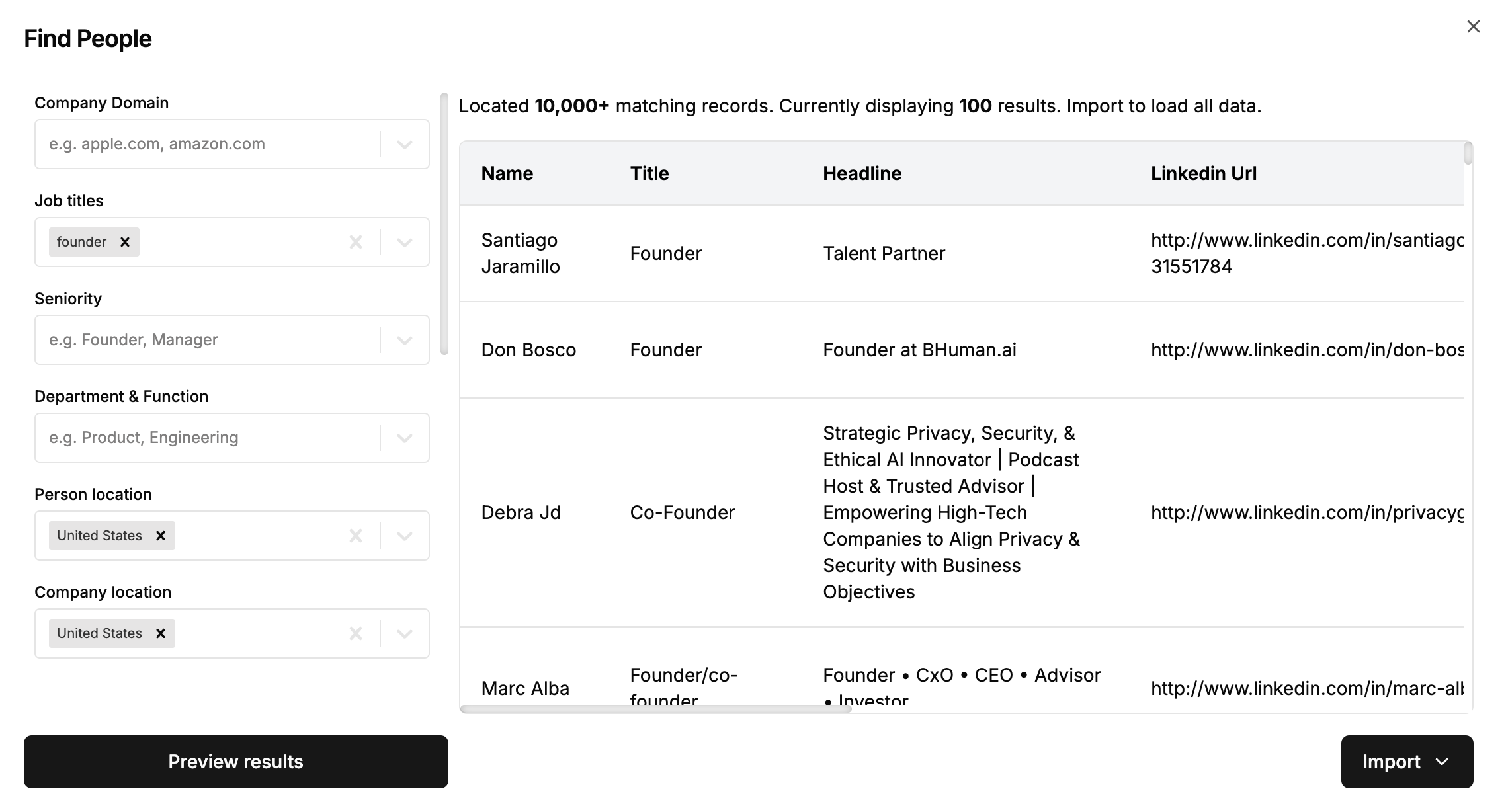
### **Generate Leads**
You can come on Bitscale with either:
1. having your **ICP figured out**. For example you know what is their industry, what is their tech stack and funding stage.
2. you are looking to **experiment** before pinning down your ICP. [Bitscale](https://bitscale.ai) will help in both these scenarios. You can search your leads using a easy to use preview format before importing them and getting started with qualification.
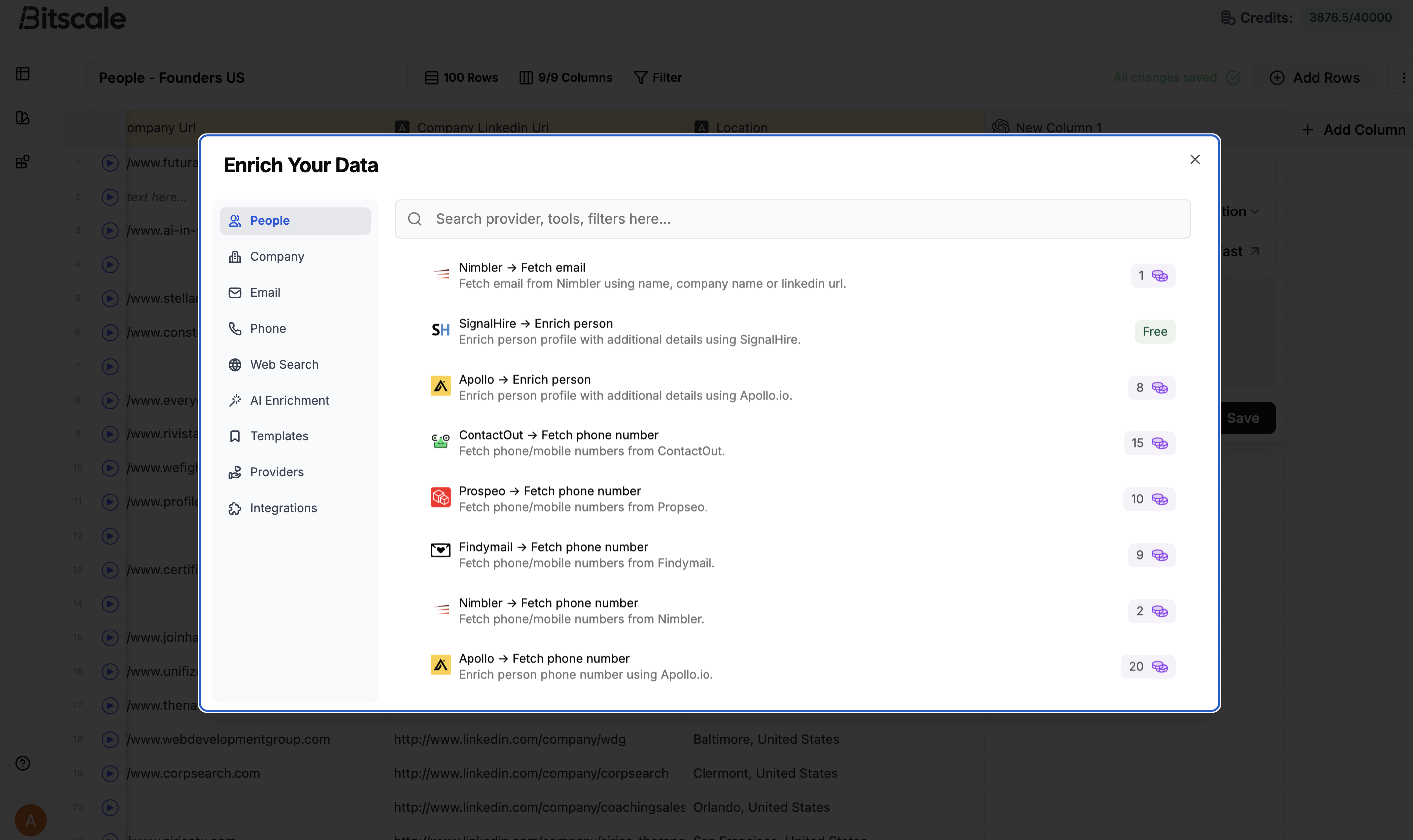
### **Enrich Leads**
This is the step where Bitscale helps with:
1. Qualifying leads using **intent signals** (social activity, company comms, funding, website info and so on)
2. Fetching **verified contact info** around the qualified leads.
This Enrichment step helps in 2 ways - in the short term you get a view on the exact pain points of the prospects and **qualify** them, in the long term you reduce your **spam rates** (negative brand-recall) by only reaching out to qualified and interested leads.
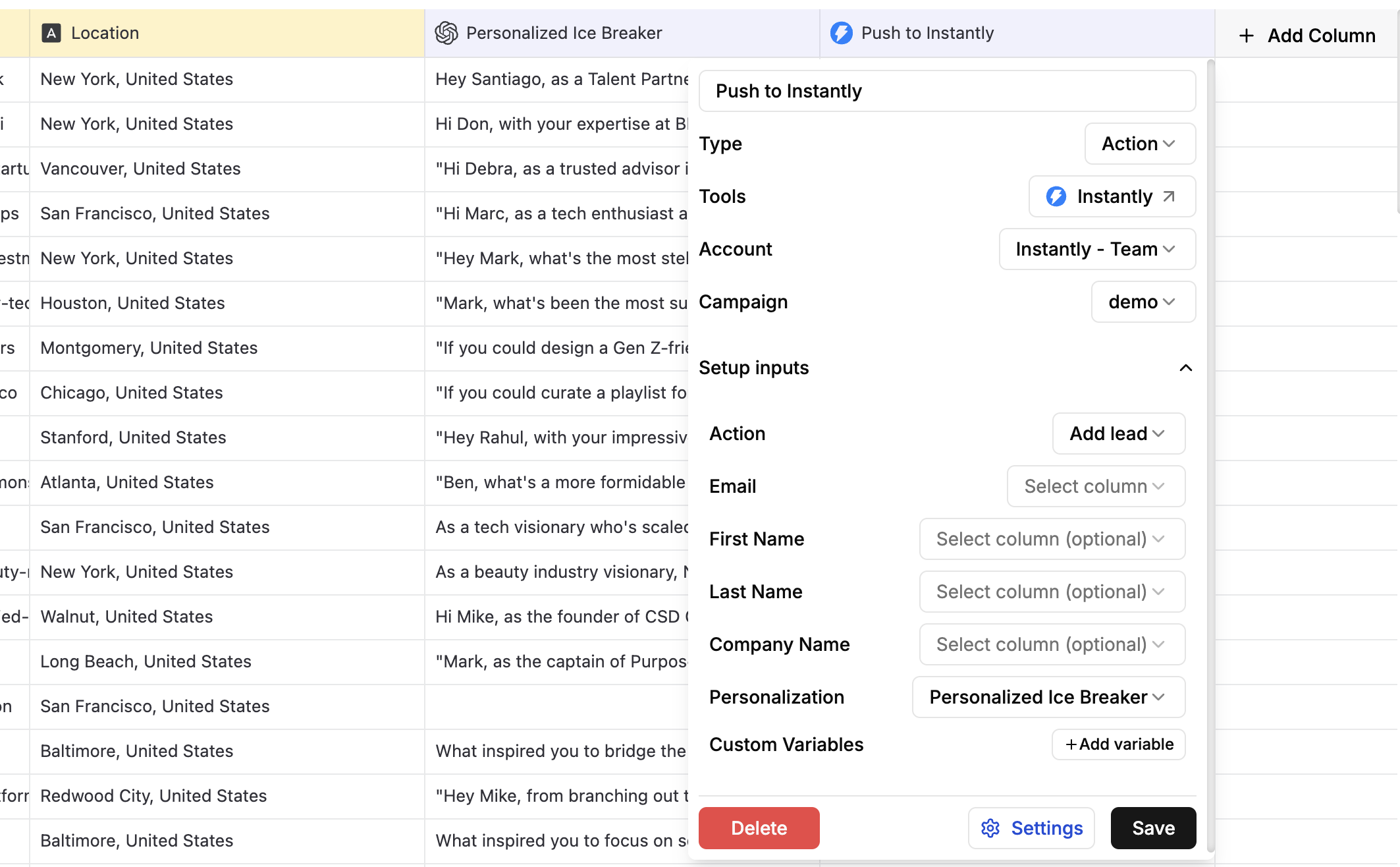
### **Outreach**
This is the final step where you are left with a list of high intent leads and necessary data points to optimize a great ice-breaker/reachout framework.
You also have the contact info of these leads to setup an Outreach tool (Smartlead, Instantly, Heyreach).
There are majorly 2 steps involved here:
1. Create a **great copy** - You can either use a pre-defined and tested template and fill in the blanks there with custom data points or you could create the entire reachout ground-up, complimented by our inhouse integration with [ChatGPT](https://chatgpt.com) and [Claude](https://claude.ai) on Bitscale.
2. Upload the Contacts and Comms on Outreach tools like [Smartlead](https://www.smartlead.ai/), [Instantly](https://instantly.ai/) & [Heyreach](https://www.heyreach.io/)
## Go in-depth
If you are looking to go into depth with any of the above steps or any other features, you can take a look other docs.
A good place to start is Playbooks. For specific tools or features, refer to the Ingredients section.
 ### **Enrich Leads**
This is the step where Bitscale helps with:
1. Qualifying leads using **intent signals** (social activity, company comms, funding, website info and so on)
2. Fetching **verified contact info** around the qualified leads.
This Enrichment step helps in 2 ways - in the short term you get a view on the exact pain points of the prospects and **qualify** them, in the long term you reduce your **spam rates** (negative brand-recall) by only reaching out to qualified and interested leads.
### **Enrich Leads**
This is the step where Bitscale helps with:
1. Qualifying leads using **intent signals** (social activity, company comms, funding, website info and so on)
2. Fetching **verified contact info** around the qualified leads.
This Enrichment step helps in 2 ways - in the short term you get a view on the exact pain points of the prospects and **qualify** them, in the long term you reduce your **spam rates** (negative brand-recall) by only reaching out to qualified and interested leads.
 ### **Outreach**
This is the final step where you are left with a list of high intent leads and necessary data points to optimize a great ice-breaker/reachout framework.
You also have the contact info of these leads to setup an Outreach tool (Smartlead, Instantly, Heyreach).
There are majorly 2 steps involved here:
1. Create a **great copy** - You can either use a pre-defined and tested template and fill in the blanks there with custom data points or you could create the entire reachout ground-up, complimented by our inhouse integration with [ChatGPT](https://chatgpt.com) and [Claude](https://claude.ai) on Bitscale.
2. Upload the Contacts and Comms on Outreach tools like [Smartlead](https://www.smartlead.ai/), [Instantly](https://instantly.ai/) & [Heyreach](https://www.heyreach.io/)
### **Outreach**
This is the final step where you are left with a list of high intent leads and necessary data points to optimize a great ice-breaker/reachout framework.
You also have the contact info of these leads to setup an Outreach tool (Smartlead, Instantly, Heyreach).
There are majorly 2 steps involved here:
1. Create a **great copy** - You can either use a pre-defined and tested template and fill in the blanks there with custom data points or you could create the entire reachout ground-up, complimented by our inhouse integration with [ChatGPT](https://chatgpt.com) and [Claude](https://claude.ai) on Bitscale.
2. Upload the Contacts and Comms on Outreach tools like [Smartlead](https://www.smartlead.ai/), [Instantly](https://instantly.ai/) & [Heyreach](https://www.heyreach.io/)
 ## Go in-depth
If you are looking to go into depth with any of the above steps or any other features, you can take a look other docs.
A good place to start is Playbooks. For specific tools or features, refer to the Ingredients section.
## Go in-depth
If you are looking to go into depth with any of the above steps or any other features, you can take a look other docs.
A good place to start is Playbooks. For specific tools or features, refer to the Ingredients section.