> ## Documentation Index
> Fetch the complete documentation index at: https://docs.bitscale.ai/llms.txt
> Use this file to discover all available pages before exploring further.
# Research - Google Web Search
> Leverage Bitscale’s Google Web Search tool to simulate advanced Google searches and retrieve specific, actionable data for your workflows.
## **Streamline Research with Google Web Search**
Bitscale’s **Google Web Search tool** is an incredibly versatile feature that acts as a **Google search simulator** with added capabilities for customization. Whether you’re looking for specific details, performing complex searches, or narrowing results to exact matches, this tool provides a streamlined approach to retrieve actionable information.
By combining keyword-based queries with prompt-driven directions, the tool empowers you to:
* Perform targeted searches.
* Retrieve precise information tailored to your needs.
* Automate research-intensive tasks with ease.
***
## **How It Works**
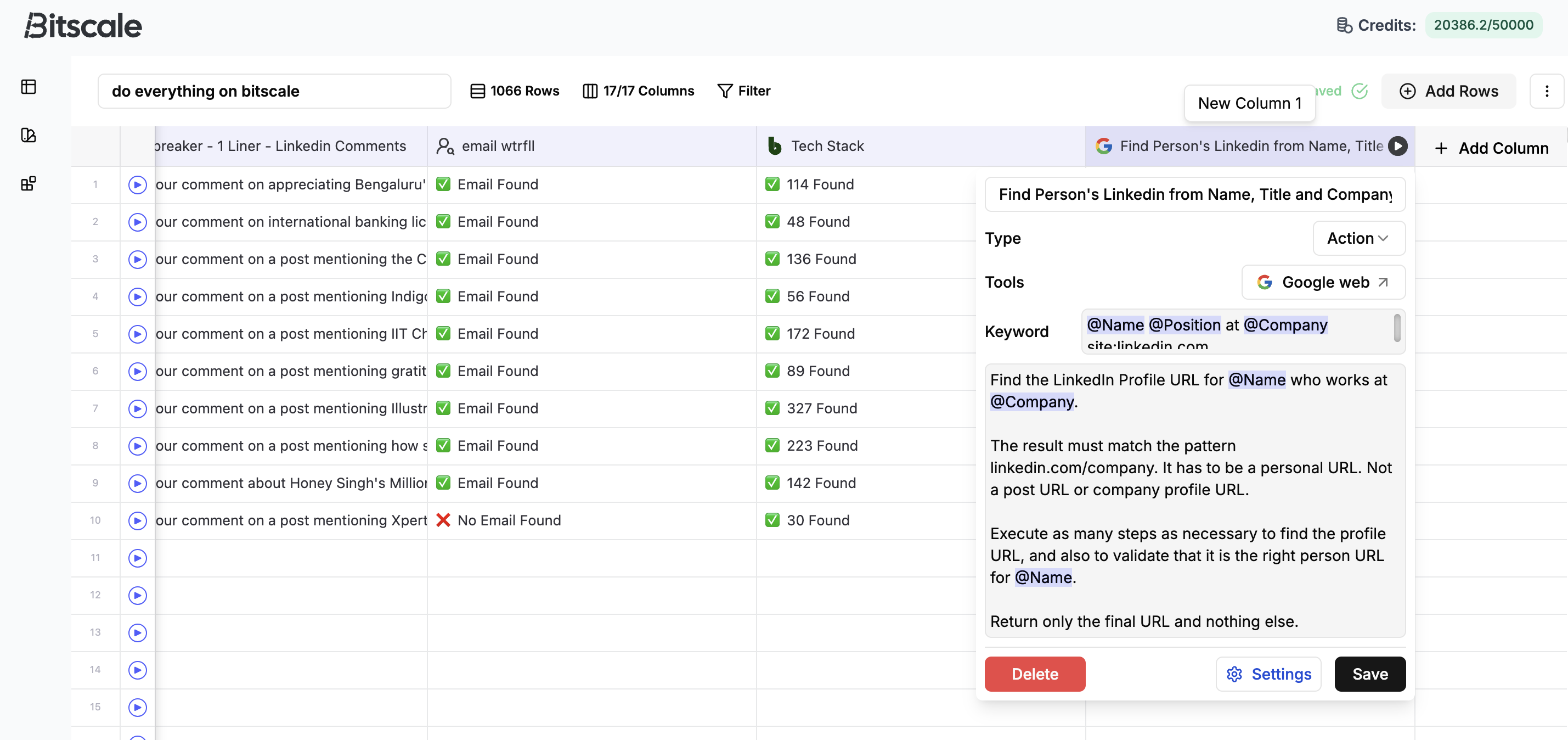 ### **1. Setting Up the Action**
To get started, add an action column and navigate to **Tools → Web Search** to find the Google Web Search tool. The interface is simple yet powerful, featuring:
* **Keyword Section**: Simulate how your query would appear in a Google search bar.
* **Prompt Section**: Add instructions to refine your search or direct the tool to focus on specific outputs.
**Example Setup:**
Let’s say you’re searching for a LinkedIn profile:
1. In the **Keyword Section**, input something like:
`"Arun account executive at Google site:linkedin.com"`
* This query restricts the results to LinkedIn domains and focuses on a specific person and role.
2. In the **Prompt Section**, provide additional directions, such as:
* **Retrieve LinkedIn profile URLs** only.
* Ensure the result matches the specific person and domain.
***
### **2. Running the Workflow**
Once set up, the tool parses through Google’s web search results to find the exact information you need. For example:
* Retrieving **LinkedIn profile URLs** for a list of names and companies.
* Refining searches for **contact details**, publications, or other specific outputs.
**Why This Matters:**
The combination of Google-like search simulation and tailored prompts eliminates irrelevant results, saving time and ensuring accuracy.
***
### **3. Using the Results**
The results, such as retrieved URLs or other targeted data, can then be:
* **Enriched further** using Bitscale’s other tools for email retrieval, qualification, or intent signals.
* **Integrated directly** into your workflows for outreach, research, or analysis.
For instance, LinkedIn URLs retrieved through this tool can be directly pumped into follow-up workflows to fetch verified contact details or analyze prospect profiles.
***
## **Key Benefits of the Google Web Search Tool**
* **Targeted Search Capabilities:** Simulate complex Google searches with precision.
* **Customizable Prompts:** Tailor outputs to retrieve exactly what you need.
* **Time Efficiency:** Automate repetitive research tasks with a few clicks.
* **Versatility:** Use retrieved data for lead enrichment, contact discovery, or deeper analysis.
***
## **Use Case Examples**
1. **Lead Discovery:**
Retrieve LinkedIn profiles for potential prospects based on their name, role, and company.
2. **Competitor Analysis:**
Search for press releases or public data about competitors using site-restricted queries (e.g., `site:competitor.com`).
3. **Academic Research:**
Narrow searches to scholarly articles or domains using targeted prompts.
***
## **Get Started**
Explore the full potential of the Google Web Search tool today:
👉 [Grid Link](https://app.bitscale.ai/grids/share?id=d1dbc027-b067-42a4-b2af-e295d968b0b7\&rowId=0) to set up and run your searches effortlessly.
**Pro Tip:** Combine keyword queries with specific prompts to focus on high-value results and minimise irrelevant data.
### **1. Setting Up the Action**
To get started, add an action column and navigate to **Tools → Web Search** to find the Google Web Search tool. The interface is simple yet powerful, featuring:
* **Keyword Section**: Simulate how your query would appear in a Google search bar.
* **Prompt Section**: Add instructions to refine your search or direct the tool to focus on specific outputs.
**Example Setup:**
Let’s say you’re searching for a LinkedIn profile:
1. In the **Keyword Section**, input something like:
`"Arun account executive at Google site:linkedin.com"`
* This query restricts the results to LinkedIn domains and focuses on a specific person and role.
2. In the **Prompt Section**, provide additional directions, such as:
* **Retrieve LinkedIn profile URLs** only.
* Ensure the result matches the specific person and domain.
***
### **2. Running the Workflow**
Once set up, the tool parses through Google’s web search results to find the exact information you need. For example:
* Retrieving **LinkedIn profile URLs** for a list of names and companies.
* Refining searches for **contact details**, publications, or other specific outputs.
**Why This Matters:**
The combination of Google-like search simulation and tailored prompts eliminates irrelevant results, saving time and ensuring accuracy.
***
### **3. Using the Results**
The results, such as retrieved URLs or other targeted data, can then be:
* **Enriched further** using Bitscale’s other tools for email retrieval, qualification, or intent signals.
* **Integrated directly** into your workflows for outreach, research, or analysis.
For instance, LinkedIn URLs retrieved through this tool can be directly pumped into follow-up workflows to fetch verified contact details or analyze prospect profiles.
***
## **Key Benefits of the Google Web Search Tool**
* **Targeted Search Capabilities:** Simulate complex Google searches with precision.
* **Customizable Prompts:** Tailor outputs to retrieve exactly what you need.
* **Time Efficiency:** Automate repetitive research tasks with a few clicks.
* **Versatility:** Use retrieved data for lead enrichment, contact discovery, or deeper analysis.
***
## **Use Case Examples**
1. **Lead Discovery:**
Retrieve LinkedIn profiles for potential prospects based on their name, role, and company.
2. **Competitor Analysis:**
Search for press releases or public data about competitors using site-restricted queries (e.g., `site:competitor.com`).
3. **Academic Research:**
Narrow searches to scholarly articles or domains using targeted prompts.
***
## **Get Started**
Explore the full potential of the Google Web Search tool today:
👉 [Grid Link](https://app.bitscale.ai/grids/share?id=d1dbc027-b067-42a4-b2af-e295d968b0b7\&rowId=0) to set up and run your searches effortlessly.
**Pro Tip:** Combine keyword queries with specific prompts to focus on high-value results and minimise irrelevant data.